Codex CLI Auto Approve Guide: --full-auto vs -a never (2026)
For / Key Points
Audience:
- Developers searching for Codex auto approve, full auto, or no-approval mode
- Teams confused by the interaction between
approval_policy,sandbox_mode, and network access - Readers comparing Codex CLI with Claude Code permission behavior
Key Points:
- Codex auto approve is not one switch; start with
--full-autofor daily development - If network access is required, keep
workspace-writeand enable network separately first danger-full-accessbelongs in isolated environments, and this guide compares that stronger path against safer defaults
Quick Answer
| If you want to... | Start with | Why |
|---|---|---|
| Reduce prompts for normal daily work | codex --full-auto | It keeps the default sandbox and is the easiest mode to recover from |
| Stop approval prompts but still keep file guardrails | codex -a never -s workspace-write -c 'sandbox_workspace_write.network_access=true' | Fewer prompts without jumping to full access |
| Run strong automation in isolated CI or containers | codex -a never -s danger-full-access | Useful when the environment itself is already disposable and externally guarded |
Related decision
If your main goal is to stop unplanned edits rather than skip approvals, read How to Use Codex Plan Mode first.
The Core Problem
Codex CLI auto-approval is not controlled by a single switch. In practice, behavior depends on three axes:
approval_policy: how often the agent asks for approvalsandbox_mode: how far file and command access can gonetwork_access: whether outbound network calls are allowed
The common mistake is to look only at approval_policy. In reality, sandbox_mode matters just as much, and --full-auto does not enable network access by default.1
Assumption as of April 27, 2026
In the current OpenAI docs, --full-auto is a shortcut for --ask-for-approval on-request and --sandbox workspace-write. Network access remains off by default in workspace-write unless you explicitly set sandbox_workspace_write.network_access = true.1 This article aligns with that current model rather than older blog posts.
Quick Start
If you remember only three commands, make them these:
# 1) Default choice for daily development
codex --full-auto "Run unit tests and fix failures"

# 2) Keep the sandbox but allow network access
codex -a never -s workspace-write \
  -c 'sandbox_workspace_write.network_access=true' \
  "Update deps and run migrate"

# 3) Strong automation for isolated environments only
codex --dangerously-bypass-approvals-and-sandbox \
  "Non-interactive build and deploy"
Which mode to choose first
Start with --full-auto or -a never -s workspace-write before jumping to unrestricted modes.
Three Configuration Methods
Method 1: Use CLI Flags Per Run
This is the simplest way to switch modes for one-off work.
# Balanced default
codex --full-auto "Fix failing tests"

# Safe mode with network access
codex -a never -s workspace-write \
  -c 'sandbox_workspace_write.network_access=true' \
  "Install packages and run migration"

# Full access
codex -a never -s danger-full-access "Refactor and run full local build"
Best for:
- one-off tasks
- ad hoc experiments
- sessions where the risk level changes task by task
Method 2: Use config.toml and Profiles
If you use the same configuration repeatedly, profiles are faster and less error-prone.
approval_policy = "on-request"
sandbox_mode = "workspace-write"

[profiles.auto]
approval_policy = "on-request"
sandbox_mode = "workspace-write"

[profiles.networked]
approval_policy = "never"
sandbox_mode = "workspace-write"

[profiles.networked.sandbox_workspace_write]
network_access = true
Launch examples:
codex -p auto "Review the repo"
codex -p networked "Update dependencies"
Best for:
- teams that want standard defaults
- stable local workflows
- environments where safe defaults should be pinned
Method 3: Override One Setting with -c
Use this when the base profile is fine and only one setting needs to change.
# Strengthen approval behavior just for this run
codex -c approval_policy=\"never\" "Task"

# Change sandbox behavior temporarily
codex -c sandbox_mode=\"read-only\" "Analyze project structure"

# Add network without rebuilding the whole profile
codex -c 'sandbox_workspace_write.network_access=true' \
  "Fetch release notes"
Best for:
- small deviations from a stable profile
- scripts and CI wrappers
- temporary experiments
Configuration Priority
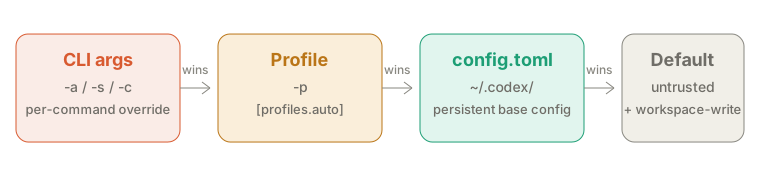
CLI arguments (-c, -a, -s) > Profile (-p) > config.toml > Default
Mode Matrix
If you want to understand the three-axis model quickly, try the simulator first.
| Use case | approval_policy | sandbox_mode | Network | Special flag | Risk |
|---|---|---|---|---|---|
| Daily default | on-request | workspace-write | off | --full-auto | Medium |
| Safe networked run | never | workspace-write | on | -c 'sandbox_workspace_write.network_access=true' | Medium-High |
| Full access run | never | danger-full-access | on | none | High |
| Fully unrestricted | - | - | - | --dangerously-bypass-approvals-and-sandbox | Extreme |
| Read-only review | never | read-only | off | none | Low |
Claude Code Mapping
Codex CLI separates approval behavior and sandbox behavior more explicitly than Claude Code. That gives you more room to tune the risk level.
| Claude Code | Codex CLI | Meaning |
|---|---|---|
claude --dangerously-skip-permissions | codex --dangerously-bypass-approvals-and-sandbox | Fully unrestricted execution |
| Default Claude workflow | codex --full-auto | Day-to-day baseline for automatic work inside the workspace |
| Conservative consultative workflow | codex /permissions → Read-only | Review the plan before edits or commands run |
allowedTools / permission rules | codex /permissions + approval policy + sandbox mode | Fine-tune what Codex can do automatically |
| Hooks | Rules / hooks / skills | Workflow shaping and automation |
About the term Plan mode
Codex now has a built-in /plan command, and that is not the same thing as read-only.23 Read-only is a safety policy. /plan is the act of drafting the plan first.
Security and Best Practices
Four Core Rules
- Default to
workspace-writefor normal development - Enable network only when the task actually needs it
- Pair stronger modes with external guardrails such as PR review or CI isolation
- Keep logs when approvals are reduced
Safer Default Commands
# Daily work
codex --full-auto "Task"

# Networked work
codex -a never -s workspace-write \
  -c 'sandbox_workspace_write.network_access=true' \
  "Task"
Commands to Avoid
# Unrestricted execution on production hosts
codex --dangerously-bypass-approvals-and-sandbox "Deploy to production"

# Hardcoded secrets
codex -a never "Use API key sk-xxxxxx"

# Full access combined with broad deletion
codex -s danger-full-access "Delete old files recursively"
Minimum Governance Baseline
Common Troubleshooting
This page stays focused on approval mode configuration. For reconnect loops and context overflow, the dedicated articles are faster and more complete.
| Symptom | Check first | Next action |
|---|---|---|
gh or curl fails under --full-auto | Network is still off by default | Add sandbox_workspace_write.network_access=true |
| Settings do not take effect | Which layer is winning | Verify CLI > profile > config.toml > default |
| The chosen mode feels too strong | Whether danger-full-access is active | Move back to workspace-write |
Long runs show re-connecting... | Outside this article's scope | Read Re-connecting issue guide |
| Runs stop on context window errors | Outside this article's scope | Read context window error guide |
FAQ
What is the default way to reduce approvals in Codex CLI?
Start with codex --full-auto. For most daily development, that is the best balance between speed and safety.
Can I keep the sandbox and allow only network access?
Yes. Use codex -a never -s workspace-write -c 'sandbox_workspace_write.network_access=true'. This keeps file protections while enabling outbound network calls.
What is the Codex CLI equivalent of Claude Code's --dangerously-skip-permissions?
The closest equivalent is codex --dangerously-bypass-approvals-and-sandbox. Treat it as an isolated-environment or CI-only mode.
Why does --full-auto still block network calls?
Because --full-auto effectively maps to on-request + workspace-write, and workspace-write does not allow network access by default.
Which wins: CLI flags or config.toml?
CLI flags win first. The priority order is CLI arguments > profile > config.toml > default.
Summary
--full-autois the right default for most daily Codex CLI work- When network access is needed, keep
workspace-writeand enable network separately - Reserve
danger-full-accessand full bypass for isolated environments only - Evaluate approval behavior, sandbox scope, and network access together rather than treating approval as a single switch
Related Articles
- Codex CLI Complete Guide
- Codex CLI Best Practices
- How to Remove Codex CLI Network Restrictions
- How to Fix the Codex CLI Re-connecting Loop
- How to Fix Codex CLI Context Window Errors
- Claude Code Auto Permission Guide
Codex agent approvals & security — current explanation of
--full-auto,--ask-for-approval,--sandbox, andsandbox_workspace_write.network_access. ↩↩Codex CLI slash commands — current docs for
/planand/permissions. ↩Features – Codex CLI — current explanation of
Read-onlyas a consultative mode. ↩